
Idempotent by Design: OpenWrt with Ansible
The baseline is backed up. Now the router builds itself.
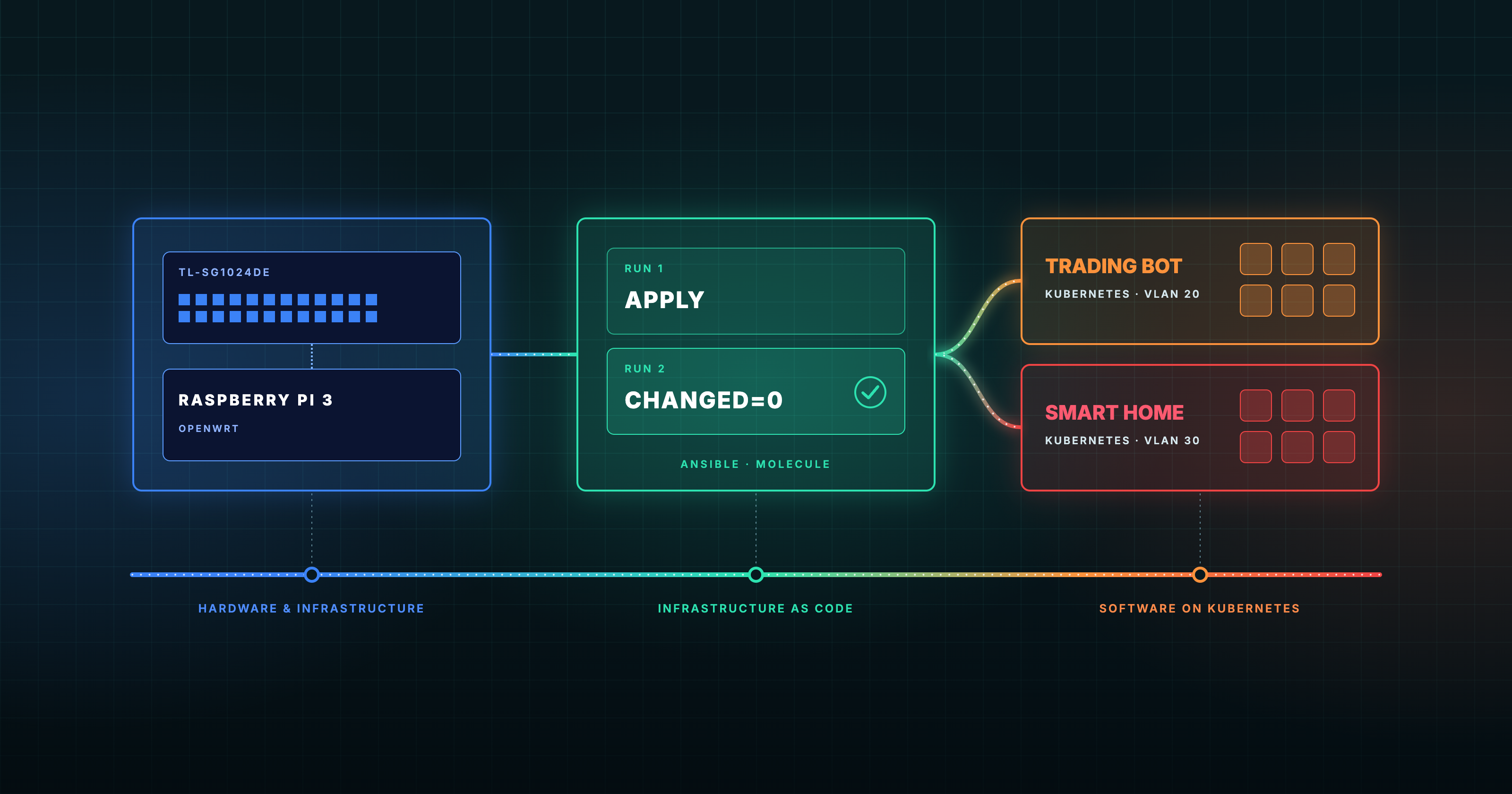
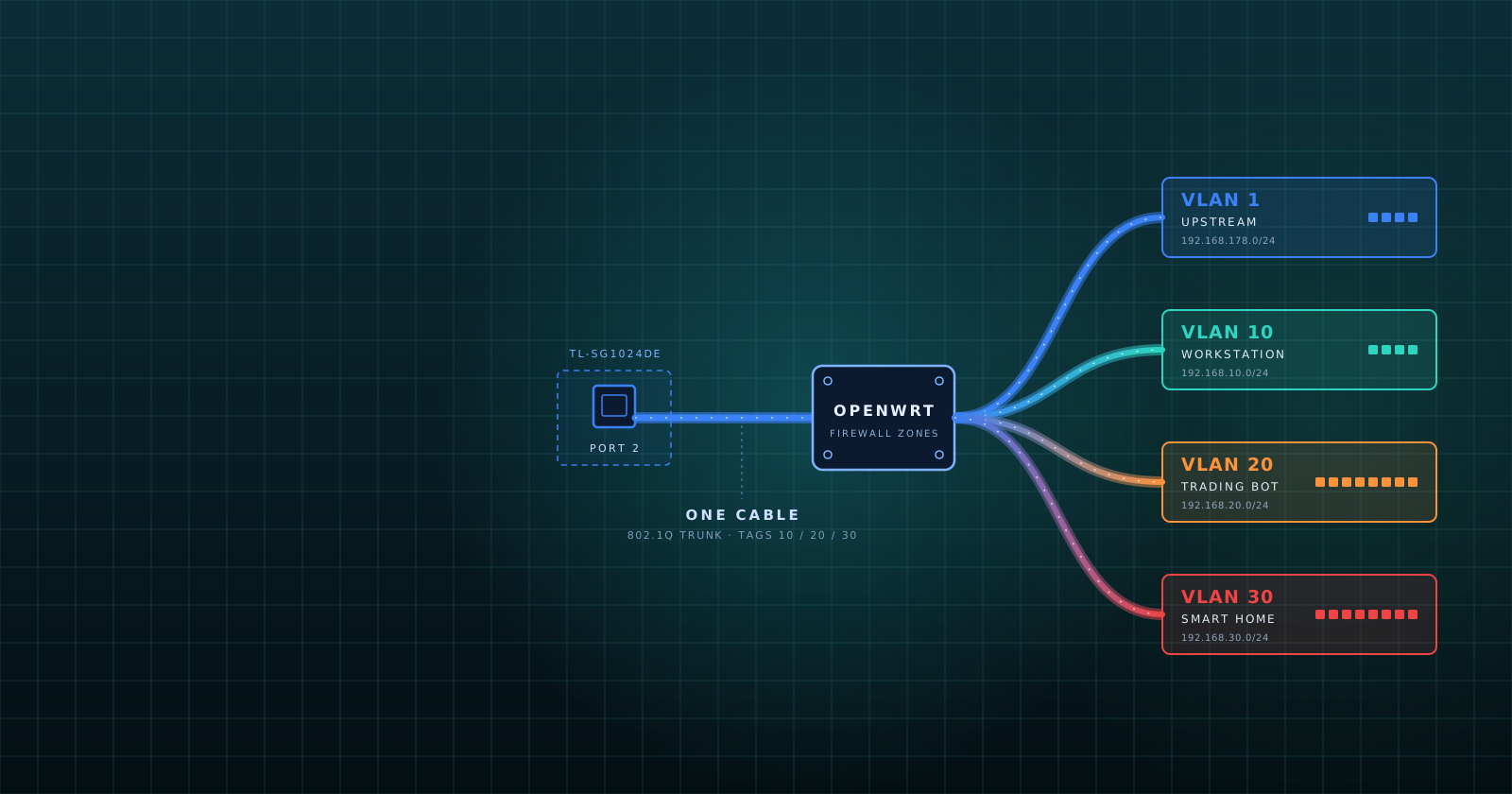
This is the second episode of Script Happens. One Cable, Four Networks covered the VLAN design and the ten lockouts that produced it. This post replaces manual configuration with an Ansible provisioner. The code is public: vrain181/labforge.
The Goal
After ten lockouts, I set one rule: nobody configures this router by hand again, including me. The provisioner has to meet four requirements:
- Rebuildable. A freshly flashed Raspberry Pi 3 reaches the baseline state with one command.
- Idempotent. A second run changes nothing.
- Safe. A bad change must not lock me out.
- Testable. Every change passes automated tests before it touches the real router.
Where the Knowledge Comes From
I did not learn automation on a homelab. I learned it at work, building cloud infrastructure for my own platform and running GitOps for applications on Kubernetes. That path led through Vagrant and VirtualBox, then Puppet, and finally Terraform and Ansible.
Today, once I speak about IaaC and its toolings I have immediately two tools in mind: Terraform provisions infrastructure, Ansible configures it. A router that already exists and needs configuration is an Ansible job.
I learned Ansible by doing, but one blog shaped me more than any documentation: The Wizard: Ansible, Molecule and Test Driven Development, written in 2017. On the surface it teaches Molecule. Underneath it teaches idempotency: a routine called twice with the same input changes nothing the second time. The article makes the point with a task that starts a service through a raw command. The task passes every functional test and still fails the idempotence check.
That lesson reaches far beyond Ansible. A backend handler that processes the same message twice must not charge a customer twice. A business process that receives the same order twice must not ship it twice. Idempotency is a property of the code.
Ansible on OpenWrt
A stock OpenWrt image ships without Python, and most Ansible modules need it on the target. The playbook installs python3-light and a few companion packages from the OpenWrt feeds. The Pi boots from a microSD card with plenty of room, so the install costs nothing.
The configuration itself goes through uci, OpenWrt's native interface. Every setting is a key in a structured tree (network, firewall, dhcp, system), and every change follows one cycle: set, commit, reload the service. The role renders its UCI edits into shell scripts and runs them on the router.
The Repository
site.yml                       the playbook: backup, reachability, Python, role, backup
inventory/hosts.yml            the router at 192.168.10.1 on VLAN 10
inventory/group_vars/openwrt/
  network.yml                  my network: VLANs, firewall rules, fixed sections
roles/openwrt/                 the role: defaults, tasks, handlers, script templates
molecule/default/              generic baseline test scenario
molecule/network/              my network test scenario
.github/workflows/ci.yml       lint and Molecule pipeline
The role defaults describe a generic OpenWrt baseline. Everything specific to my lab lives in network.yml. The router address sits on VLAN 10, the management network from the last post, so Ansible reaches the router over the same path my workstation does.
The Variables Describe the Design
The whole network lives in one file, inventory/group_vars/openwrt/network.yml. This is the VLAN table from the first episode, as data:
openwrt_trunk: eth0

openwrt_vlans:
  - id: 10
    address: '192.168.10.1'
    netmask: '255.255.255.0'
    dhcp:
      start: 100
      limit: 150
      leasetime: '12h'
      dhcp_options:
        - '6,192.168.10.1'
    zone_forward: 'ACCEPT'
    allow_uplink: true
    uplink_forward_legacy_path: 'firewall.@forwarding[0]'
    block_uplink_network: true
    block_uplink_router: true

  - id: 20
    address: '192.168.20.1'
    netmask: '255.255.255.0'
    dhcp:
      start: 100
      limit: 150
      leasetime: '12h'
    zone_forward: 'REJECT'
    allow_uplink: true
    block_uplink_network: true
    block_uplink_router: true
VLAN 30 mirrors VLAN 20. Each entry generates a VLAN device (eth0.10), an interface, a firewall zone, a forwarding to the upstream zone, and the block rules for the home LAN and the router's upstream address. A DHCP pool exists only when the entry sets dhcp. The pool starts at offset 100 with a limit of 150, which gives .100 to .249. VLAN 10 forwards with ACCEPT, and VLANs 20 and 30 with REJECT.
The uplink_forward_legacy_path key on VLAN 10 points at a forwarding that already existed on the router from my manual days. The role renames it instead of creating a duplicate, which makes the migration from hand-built to automated state clean.
Everything the loop does not generate sits in openwrt_site_sections: the uplink interface, dnsmasq, SSH, the firewall zones, the disabled Wi-Fi interface, the two forwardings from VLAN 10 to VLANs 20 and 30, and the traffic statistics. Even the vnstat interface list derives from openwrt_vlans, so a new VLAN shows up in the statistics without a second edit. Adding a fourth network is a short edit to one file.
Testing with Molecule
Idempotency is a claim, and a claim needs a test. Molecule runs the role inside OpenWrt's own rootfs container image, with no QEMU and no KVM. Two scenarios cover the project: default tests the generic baseline, and network tests my network. Each scenario runs converge, verify, and an idempotence check that must report changed=0.
The pipeline also runs yamllint, ansible-lint with the production profile, and shellcheck on the router scripts. A helper playbook renders those scripts with the real variables, so shellcheck sees exactly what would run on the router. GitHub Actions runs everything on every push. CI never contacts a router and holds no secrets.
Surviving the Lockout
Applying a network change over the network that carries the session is the mistake that cost me ten resets. Four layers protect every run:
- Backup. The first task archives the router configuration with
sysupgrade -band saves the uncommitted UCI state. A second backup follows a successful run. - Stage and approve. The role writes all edits to the uncommitted UCI delta, prints the diff per package, and waits. Only an explicit
yescommits. Any other answer reverts the staged edits. - Dead-man switch. Before a
networkorfirewallcommit, the playbook arms a timer on the router. The timer restores the old configuration after 180 seconds unless I confirm. - Confirm. After the reload, the playbook checks that SSH still answers and asks for a
yes. That cancels the timer. If a change breaks the management path, the confirmation never arrives, and the router restores itself. A dry run uses the same playbook with the approval prompt answered empty: staged changes revert, and nothing commits.
This is what I learned from the exercise. A physical device that locks you out needs a physical visit. A VM or cloud instance that locks you out gets deleted and recreated, following the cattle-versus-pets principle. A router is not cattle: I cannot dispose of it and spin up a replacement whenever a change goes wrong. It is a pet that I cannot afford to kill, so it needs a safety net of its own.
Logging the Run
A rollback timer needs a witness. The playbook writes a log for every run and pushes it by REST to Loki in my Grafana Cloud instance. I registered at grafana cloud and built that instance for the future: Alloy will ship abstract metrics and logs from the Kubernetes clusters into it. The router became its first customer, because I wanted to see what happens on the machine during a run.
Each run gets an ID and a start marker, and every staged edit, approval, backup, timer event, and service reload carries it. This is the run that added VLANs 20 and 30 on the real Pi, trimmed and in chronological order:
01:09:19  started run=20261108010859
01:09:39  created section network.vlan20 (interface)
01:09:39  created section network.vlan30 (interface)
01:09:44  approved by the operator; committing
01:10:02  snapshot /tmp/openwrt-ansible-rollback/run.EbmDOj created
01:10:02  backed up /etc/config/network
01:10:02  backed up /etc/config/firewall
01:10:02  timer armed pid=3800; restores in 180s unless confirmed
01:10:03  committed to /etc/config
01:10:03  Interface 'vlan20' is now up
01:10:03  Interface 'vlan30' is now up
01:10:15  DHCP, IP range 192.168.20.100 -- 192.168.20.249, lease time 12h
01:10:15  DHCP, IP range 192.168.30.100 -- 192.168.30.249, lease time 12h
01:10:28  confirmed by the operator; timer stopped and snapshot removed
01:10:38  finished run=20261108010859
The excerpt shows the whole safety chain on real hardware. The snapshot covers network and firewall, the two packages that can cut the session. The timer arms for 180 seconds, I confirm after 26, and the timer stops. The DHCP pools come up with the ranges from network.yml.
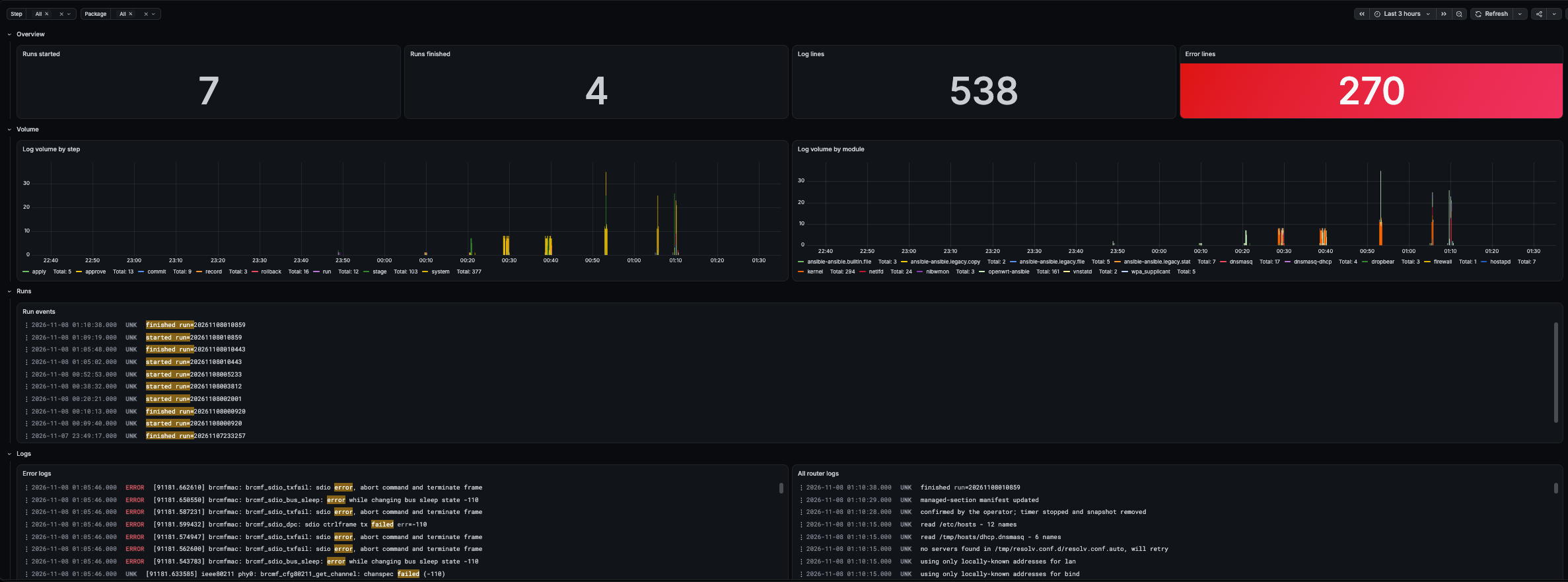
The happy path is not the only path I tested. I also broke a change on purpose, withheld the confirmation, and watched the timer fire and restore the old configuration.
The Pusher Dies With the Session
The logging cost more effort than the playbook. The scripts grew so complex that I gave up and asked the AI assistant what was wrong. The cause was simple, and obvious in hindsight: Ansible runs commands over SSH. When the task finishes, the SSH session ends, and the log pusher dies with it.
That was one of several bugs:
- The pusher died with the session. Nothing outlived the Ansible task that started it.
- The start marker came too early. I wrote it before the pusher was reading, so the pusher never saw it.
- The timestamps were wrong. The script read the log after the changes were done instead of streaming it.
- The key events came last. The confirmation cancels the timer after the pusher is gone, so the event that matters most never reached Loki.
The fix is nohup. The playbook starts the pusher with nohup in the background, so it ignores the hangup signal when the SSH session ends. The pusher keeps running until the playbook finishes, and only then do I terminate it. That order also solves the last bug: the confirmation that cancels the timer is now logged before the pusher stops.
The AI's debugging did not help at first. It added delays and ran the pusher from an interactive shell, and an interactive shell is not how Ansible runs anything. I stopped it at that point, because it never reproduced Ansible's execution model: a non-interactive session that ends when the task ends. The lesson is to test a script the way the automation runs it.
The Wi-Fi Flood
The first logs also showed something I did not expect:
00:38:52  brcmfmac: brcmf_sdio_bus_sleep: error while changing bus sleep state -110
00:38:48  brcmfmac: brcmf_sdio_dpc: failed backplane access over SDIO, halting operation
00:38:47  brcmfmac: brcmf_sdio_dpc: sdio ctrlframe tx failed err=-110
Errno 110 is a timeout. These lines came from the built-in Wi-Fi chip of the Pi 3. They arrived in bursts every few milliseconds, and the kernel suppressed dozens more. In the last post I wrote that the built-in radio is disabled. That was wrong. I had disabled the wireless interface in UCI, but the driver was still loaded and failing. The AI flagged the error flood as a possible throttling risk for Loki, and that warning led me to the root cause. The playbook now disables the module on the Pi itself with one line in
/boot/config.txt:
[all]
# Place your custom settings here.
dtoverlay=disable-wifi
The overlay takes effect at the next boot.
Note: The overlay name depends on the model: this is the Pi 3 line, and the Pi 5 uses disable-wifi-pi5.
Reports
Every run that changes the router ends with an email. It contains the diff between the router state after the run and the backup taken just before it. Lines that hold a key or password option are masked, so the mail never carries a secret. The first report I received showed exactly one change, in the mail client configuration itself:
The playbook run changed the router. The diff compares it with the backup
taken just before the run (before-20261107-002419).

--- before/etc/msmtprc
+++ after/etc/msmtprc
A second job runs at 3 AM and installs package upgrades unattended. It reports in its own mail, so a configuration change and a package upgrade never share a message. The playbook decides what changed on purpose, and the nightly job decides what changed by schedule. AI wrote both scripts, and I reviewed every line.
What Ansible Cannot Reach
The TP-Link TL-SG1024DE has no API. Its VLAN table and PVIDs stay manual, and Ansible does not manage the switch. The repository documents the switch configuration as a checklist, so a reset costs minutes instead of an afternoon of guesswork. That is the boundary of the automation, and I state it plainly.
Known Limits
Molecule cannot exercise the approval prompt or the rollback timer, because the test container has not all processes needed. The real Pi covers both paths: the logs show the timer arming and stopping after my confirmation, and a deliberate break made the timer fire.
The Test
The first test used no special setup. I started from the backup of my manual configuration and added the safety tasks before any configuration task: take a backup, roll back if no confirmation arrives, take a second backup after the changes. The net came first, and the features followed.
Then I ran the playbook against the router and compared the result to the baseline.
- Behavior. The router behaved the same before and after. Nothing changed for the clients on any of the three VLANs.
- Diffs. The early runs renamed some firewall rules and duplicated some configuration. I fixed both immediately.
- Failures. Nothing broke. The backup was in place, and the rollback timer covered every network and firewall commit. I did not keep the logs of the first runs, so there are no numbers to show. The repository now keeps a backup before and after every run.
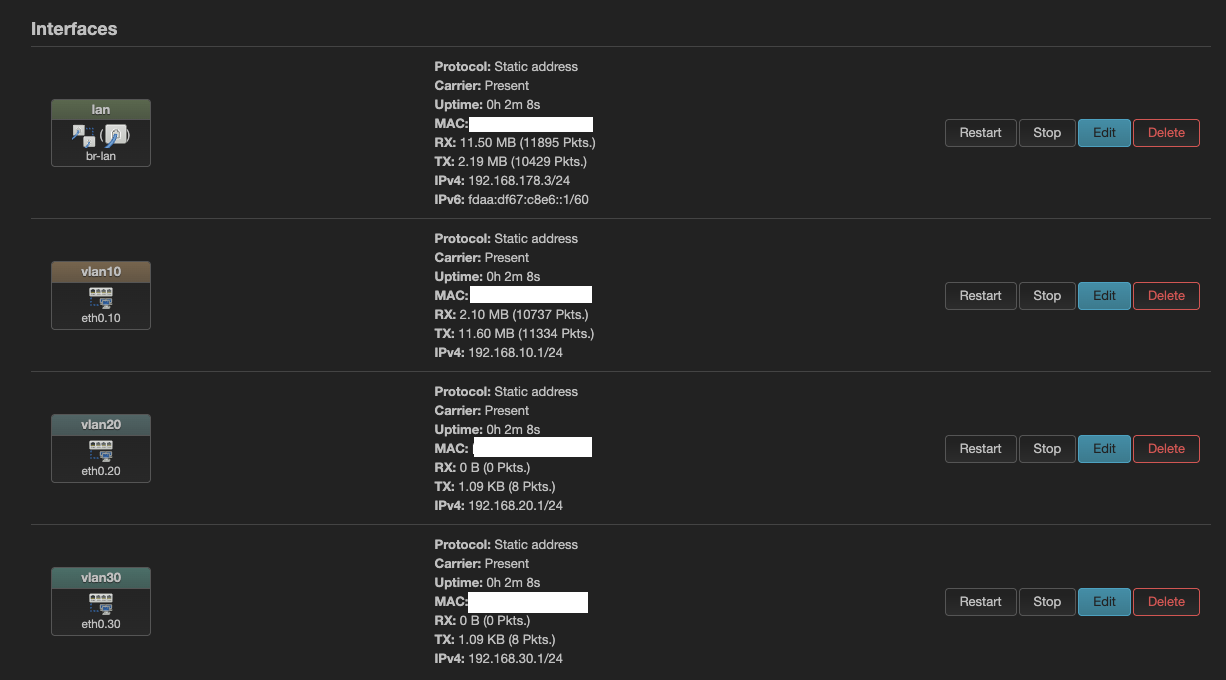
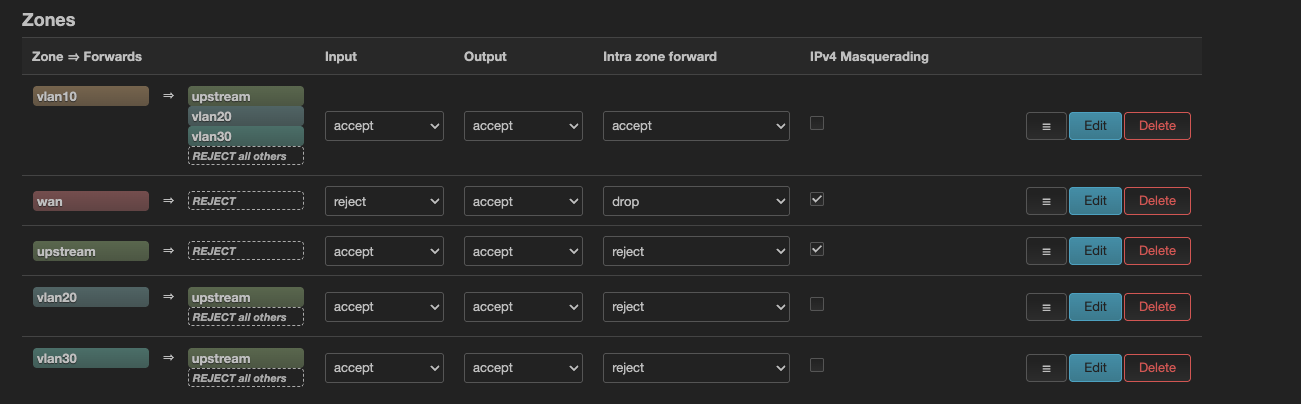
I also checked the result in the OpenWrt web interface.

Where AI Helped
AI did three jobs here. First, it challenged my design before I built it. Second, it wrote the tedious scripts: the notification scripts, the unattended update setup, and the Molecule tests. Third, its warning about a possible throttling on Loki led me to the Wi-Fi errors.
It also failed twice, and both failures taught me something:
- It missed a real mistake. My configuration allowed DHCP leases from two servers on the uplink network: the FritzBox and the OpenWrt router. Devices received their leases correctly, but only by luck. The AI passed the configuration through without comment. My reading is that it took the configuration as my intent and did not question it. The fix is one option in
network.yml:
     # The uplink network is served by the upstream router. ignore=1 keeps this
     # router out of it, so clients never see two DHCP servers.
     - path: 'dhcp.lan'
       type: dhcp
       options:
         interface: 'lan'
         ignore: '1'
- It debugged the wrong thing. It added delays and ran the pusher from an interactive shell. I stopped it when I saw that it never tried to run the script the way Ansible does. The rollback mechanism was different: I learned it through this exercise, and I had to understand it before I could judge what AI wrote for it.
The lesson is the one every engineer knows from code review, and it applies to AI output with extra force: the human stays in the loop, and every change gets reviewed. That costs time. The playbook builds the same rule into its design: the approval prompt shows the full diff and commits nothing until I type yes.
What's Next
The router is now code. Next comes Kubernetes.
Comments
Join the discussionNo comments yet. Be the first to comment.
Script happens
Automation, configuration, and orchestration: making homelab hardware work with Ansible, OpenWrt, Kubernetes, and a healthy dose of debugging.